
A lot of people don’t realize this until they actually need to do it: recording a video is the easy part. The annoying part starts afterward.
A teacher records a lesson and ends up with 40 minutes of extra setup and pauses. A student finishes a presentation video but wants to cut out the awkward beginning. Someone records a school event on their phone and later discovers the video is sideways.
None of these are complicated problems. But traditional editing software makes them feel complicated very quickly.
The good news is that basic video editing no longer requires downloading heavy apps or learning professional editing tools. For most school-related work, a simple browser-based video cutter is enough.
Why Video Has Become Part of Everyday Learning
Video is now part of normal classroom life in a way it wasn’t a few years ago.
Teachers use recordings for revision lessons, flipped classrooms, tutorials, and event documentation. Students use video for presentations, project submissions, experiment demonstrations, interviews, and creative assignments.
And most of the time, the raw recording isn’t ready to share as-is.
A 30-minute explanation might only need the middle 12 minutes. A science experiment recording may include several minutes of setup before the actual demonstration starts. A group presentation might need to be split into separate sections before submission.
That’s where simple editing tools become useful — not for cinematic production, just for cleaning things up enough to make the video easier to watch and share.
The Problem With Traditional Editing Software
Professional editors like Adobe Premiere Pro, Final Cut Pro, or DaVinci Resolve are powerful, but they’re designed for full production workflows.
For everyday school use, they’re often too much.
They usually require:
● Large downloads and installations
● High-performance computers
● Significant storage space
● Time to learn the interface
● Paid licenses or export restrictions
Most students and teachers don’t need multi-track timelines, advanced color grading, or motion graphics. They usually just need to:
● trim a video,
● split a recording,
● rotate a clip,
● crop the frame,
● or export a cleaner version.
Opening a professional editor just to remove five minutes from the beginning of a recording can feel unnecessarily heavy.
What Browser-Based Video Editing Tools Actually Do
Browser-based editors work directly inside a web browser. No installation. Usually no account creation either.
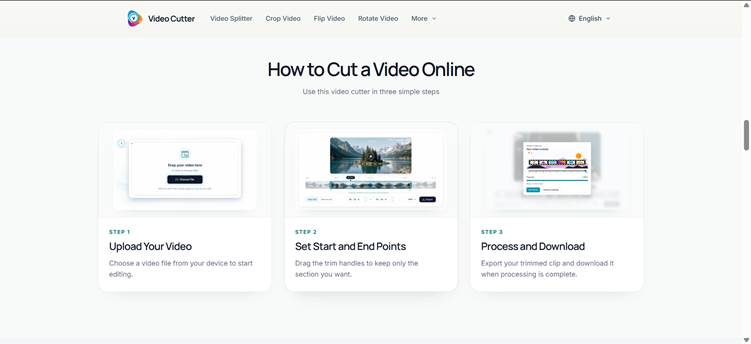
Tools like Video Cutter focus on simple editing tasks that people actually need most often.
That includes:
Trimming Videos
This is the most common task.
You upload a video, set where you want it to start and end, and export only that section.
Useful for:
● removing dead air,
● cutting setup time,
● shortening recorded lessons,
● cleaning up presentation videos.
Splitting Long Recordings
Instead of exporting one long file, you can separate it into smaller sections.
This helps when:
● a lecture needs to be divided into chapters,
● a workshop recording needs shorter clips,
● or a long presentation should become multiple submissions.
Cropping and Resizing
Sometimes the recording itself is fine, but the framing isn’t.
Cropping helps remove distractions in the background or resize horizontal videos into vertical formats for social media or mobile viewing.
Rotating and Flipping
Phone recordings occasionally end up sideways or upside down. A simple rotation fixes it in seconds.
Supporting Common Video Formats
Most lightweight browser editors support formats people already use:
● MP4
● MOV
● MKV
● AVI
● WebM
MKV support matters more than people expect because screen recording tools and OBS recordings often use it by default.
Why Simplicity Matters More Than Features
Most people editing videos for school or teaching aren’t trying to become video editors.
They just want:
● the video shorter,
● cleaner,
● easier to share,
● and ready before the deadline.
That’s why lightweight tools are often more practical than feature-heavy ones.
A browser-based cutter usually lets someone:
- open the site,
- upload the file,
- trim the unnecessary parts,
- export the result,
- and move on.
No project setup. No timeline confusion. No tutorials required.
For beginners, that simplicity matters a lot more than having hundreds of editing features they’ll never touch.
Real Situations Where Online Video Editing Helps
Recorded Lessons
Teachers often record longer explanations than necessary. Trimming out pauses and setup sections makes the lesson easier for students to revisit later.
Student Presentations
A student might record multiple takes before getting comfortable speaking. Instead of re-recording everything, they can simply cut away the rough beginning.
Science Demonstrations
Experiment recordings usually contain setup time before the actual demonstration begins. Trimming keeps the focus on the important section.
School Events and Activities
Sports days, performances, exhibitions, and ceremonies often produce very long recordings. Simple cuts help turn them into shorter highlights that are easier to share with families and classmates.
Online Classes and Remote Learning
Long meeting recordings are difficult to revisit later. Splitting lessons into smaller sections makes them much easier to watch and review.
Things That Make the Process Easier
Check the File Size First
Phone videos get large surprisingly fast.
A high-quality recording can easily reach several hundred megabytes or more. Most browser-based tools comfortably handle files up to around 2GB, which covers most normal classroom recordings.
If the file is extremely large, compressing it first with HandBrake can make editing smoother.
MP4 Is Usually the Safest Export Format
If you’re unsure which format to export in, choose MP4.
It works on almost everything:
● laptops,
● school projectors,
● tablets,
● phones,
● and learning platforms.
Close Other Browser Tabs
Browser video editing uses memory heavily.
If the device is older or slower, closing unnecessary tabs before editing can make the process noticeably smoother.
Preview Before Exporting
Always play a few seconds around your cut points before exporting.
Tiny mistakes are easy to miss during trimming, and checking them early saves time later.
Keep the Browser Tab Open During Export
Large videos can take several minutes to process.
Leaving the tab active helps prevent slowdowns or interruptions while exporting.
Browser Tools vs Installed Software
|
Feature |
Browser-Based Tools |
Installed Software |
|
Installation needed |
No |
Yes |
|
Storage required |
Minimal |
Often large |
|
Works on shared devices |
Yes |
Sometimes restricted |
|
Beginner-friendly |
Usually |
Not always |
|
Best for quick edits |
Yes |
Often excessive |
|
Good for advanced production |
Limited |
Yes |
|
Easy to start using |
Very |
Less so |
For everyday educational use, lightweight browser tools are usually enough.
Video Editing Is Becoming a Basic Digital Skill
Knowing how to clean up a recording, trim unnecessary sections, or export a shareable clip is now part of normal digital communication.
Not because everyone needs to become a creator or editor — but because video has become a standard way people explain ideas, document projects, and communicate online.
And honestly, most people only need a handful of simple editing actions to make their videos dramatically more useful:
● trim,
● split,
● crop,
● rotate,
● export.
That’s it.
The important thing is that the barrier is much lower than people assume. You no longer need expensive software, powerful hardware, or advanced technical skills just to make a recording usable.
For students and teachers especially, lightweight browser-based tools make the whole process feel less intimidating — which usually means people are more likely to actually use video in the first place.


.webp)
.webp)